email spider fast email extractor extract emails email spider email tool email software cheap email extractor
|
a   Product Catalogue

Parivartak v3.5
(Unicode Converter for Hindi, Marathi, Nepali and Devnagari Script)
Parivartak v3.5 is all new HINDI UNICODE CONVERTER & EDITOR. It can easily convert Kruti Dev/Shusha font to Unicode Mangal Font and saves your precious time. It supports Kruti to Mangal font conversion, Shusha to Mangal, Kruti to Shusha and Shusha to Kruti conversion. It also has an Unicode Editor which supports Kruti and Shusha style of typing for Unicode. The new version has the capability to leave English as it is so you don’t have to reformat your document after conversion. You can copy paste the data or you can import text from RTF/TXT files for conversion. It converts data accurately and with lightening speed. It also has an Onscreen Hindi keyboard in Editor Mode by which you can easily insert unicode text. In this version we have fixed earlier bugs and made it more reliable and accurate. Also introduced new functionality with reliable conversion engine.
Key Features:
1. The first tool in the Market which supports True Conversion of Hindi Unicode.
2. You don't have to format your English text.
3. The new Unicode Editor is accurate and reliable.

In Parivartak Unicode Editor you can type Hindi and Other Devnagari Scripts like Marathi, Nepali, Konkani, Kashmiri, Maithili and Sanskrit in Mangal or Arial Unicode MS as you type in Kruti or Shusha Font.

In Parivartak Unicode Converter you can convert Hindi and Other Devnagari Script like Marathi, Nepali, Konkani, Kashmiri, Maithili and Sanskrit text in Mangal or Arial Unicode MS and can save the converted text in MS Word, Notepad and for Website as HTML file.

Click on Video Tour button to go through an video based tutorial
1: Buy Registration
2: How it Works

Step 1: Registration
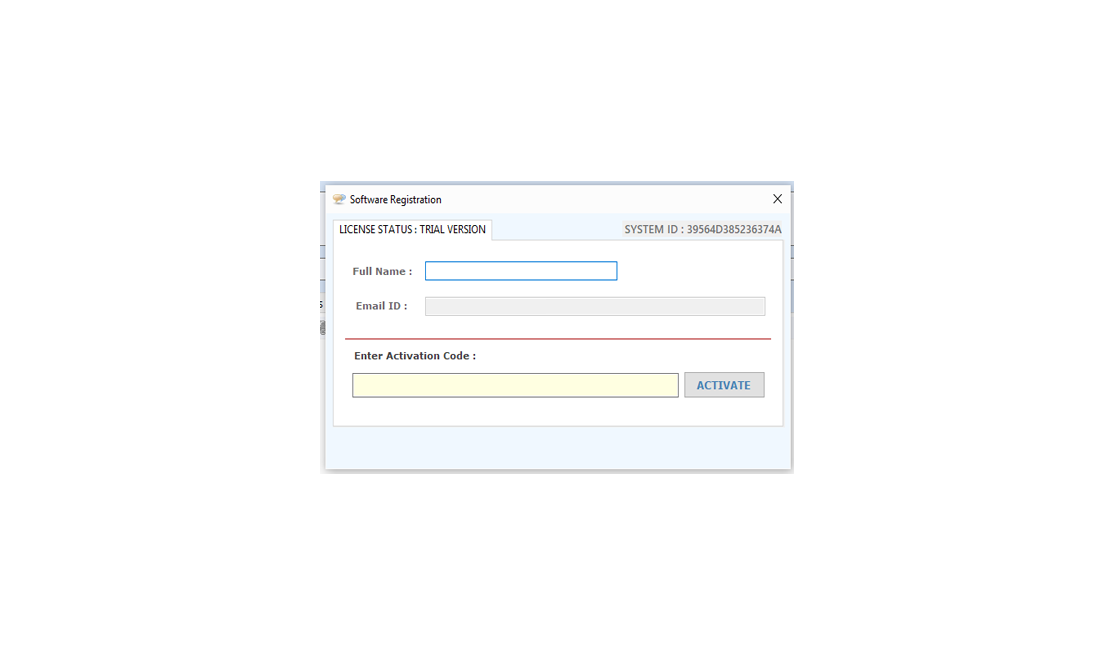
The screen shown as below will display in un-registered version every time.
Activation Screen

Register : for registering the "Parivartak v3.5" please send us your "Customer Id" from the above window by click "Get Registration Key" button. After confirmation of payment we provide you an "Activation code" that registers your "Parivartak v3.5".

Payment Options

Buy: for payment for "Parivartak v3.5", please click "Buy" button in the window like above or send to us cheque/DD in favour of "Technocom" payable at Delhi.

Activate: Please enter your name in "Register to : " textbox and "Registration Key" which we provide you when you have bought the tool in the activation code text field and click Activate button.

How to Buy Parivartak:

    • First Window of execution contains a "Buy" Button as show above...
    • Click Buy button an online Buy form will open.
    • Fill all required information in on-line Buy form.
    • After realizing your payment you will get an Activation key.

Download Links
 Download
 Download
Info
File Size
3.20 MB
 Limitation
15-uses trial
 Price
$ 34.95
Buy
buy now
Support
Excel Data Cleaner Add-in Support
We Accept
cards


How to use Parivartak v3.5
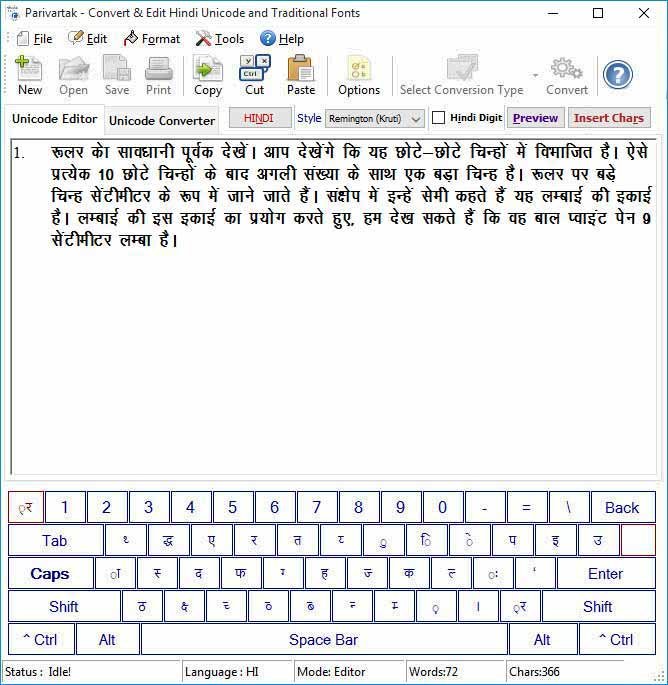
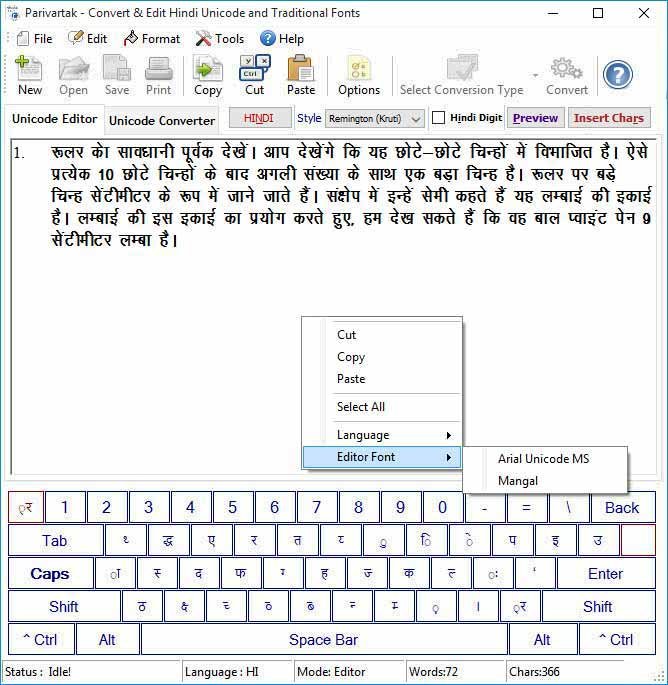
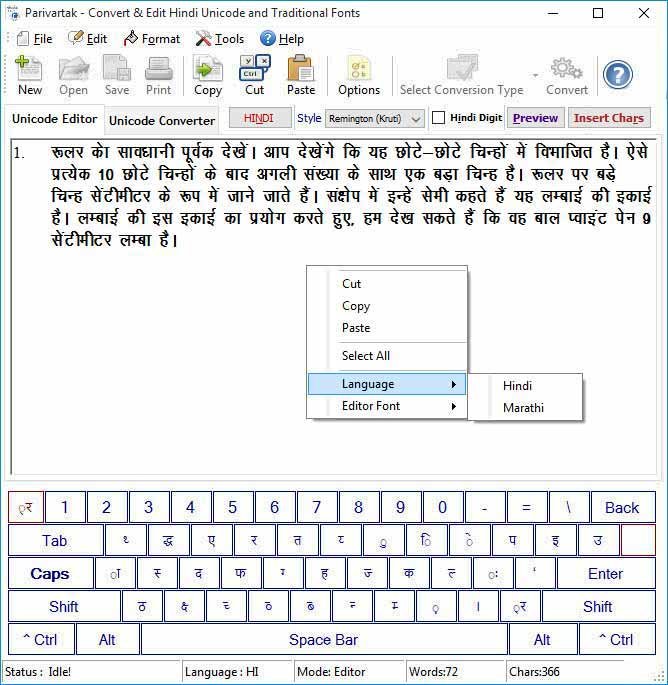
Unicode Editor : You can use Parivartak in Editor Mode for typing & editing Hindi Unicode (Mangal) in Kruti and Shusha Keyboard layout it means all popular keyboard layout like Remington and Semi-Phoenetic is supported by Parivartak for Typing in Mangal or Arial Unicode MS.  It also has an Onscreen Keyboard & Special Characters Chart, if someone doesn't know any type of keyboard can use onscreen keyboard & Special Characters Chart . You can also Preview your typed text in MS Word, Notepad and HTML Browser and can save the same.
Editor

In Parivartak Unicode Editor you can type Hindi and Other Devnagari Script like Marathi, Nepali, Konkani, Kashmiri, Maithili and Sanskrit in Mangal or Arial Unicode MS as you type in Kruti or Shusha Font..

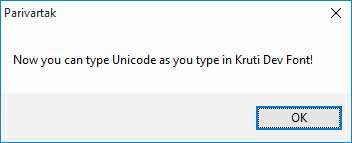
Enable Remington (Kruti) layout for typing Hindi in Unicode Mangal font as Kruti Style of typing press Ctrl+Shift+R. Confirm Alert Message appears, click ok and Start typing.

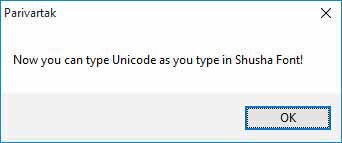
Enable Semi Phoenetic (Shusha) layout  for typing Hindi and Other Devnagari Script like Marathi, Nepali, Konkani, Kashmiri, Maithili and Sanskrit in Unicode Mangal font as Shusha Style of typing press Ctrl+Shift+P. Confirm Alert Message appears, click ok and Start typing.

Editing Exist RTF/TXT files to edit any exist RTF/TXT file click Open from File Menu or Press Ctrl+O choose file from Open Dialog box. In Unicode Editor edit and save your file.

Language, you can change Language to get accurate text, Click Tools Menu and Language Sub Menu to Choose Marathi or Hindi for other Devnagri Script like Nepali, Konkani, Maithili and Bhojpuri etc. You can aslo right click on Unicode Editor to Change the Language.

editor
Editor Font : You can change Editor Font to Arial Unicode MS or Mangal.
editor

Saving Unicode Text in RTF/TXT Format to save typed unicode text in RTF/TXT File just press Ctrl+S or click Save As from File Menu. Enter File Name in Save Dialog Box.

Preview typed Unicode Mangal text in Notepad/MS Word/Web Browser by clicking on Preview Button.

Printing Text to print simply press Ctrl+P or click on Print from File Menu. Print Dialog box appears choose Printer Name and press Print.

Onscreen Keyboard in Editor Mode, you can see an onscreen keyboard, it helps you to insert unicode text if you do not know any type of Hindi typing.

Special Characters in Unicode Editor can be inserted by cliking on chars buttons or by their ascii value.
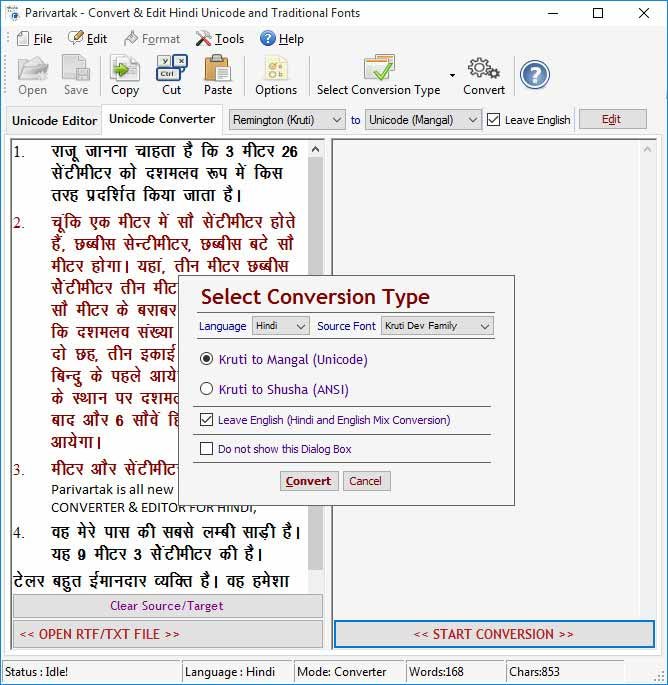
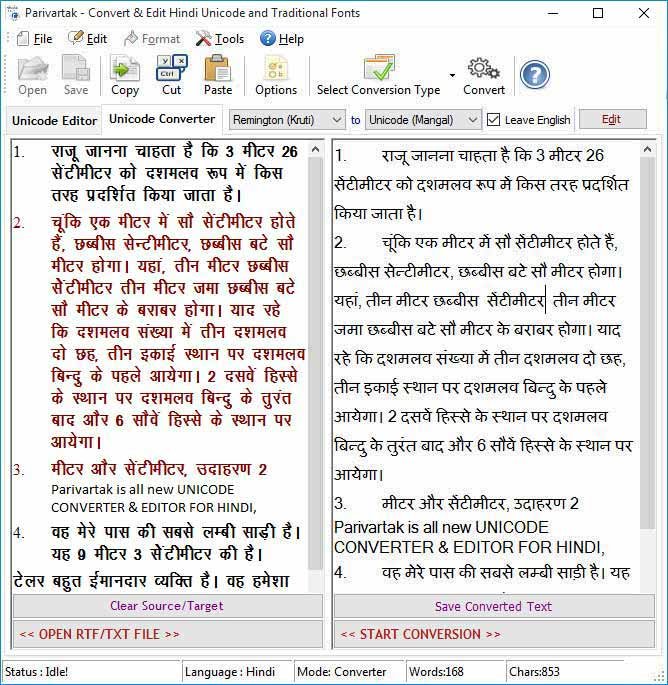
Unicode Converter : You can use Parivartak in Converter Mode. In Converter Mode you can convert your existing document typed in Kruti, Shusha, DevLys, Priya, Walkman-Chanakya, Shivaji and Narad font into Unicode Mangal (Arial Unicode MS) and Kruti to Shusha, Kruti to Shivaji or Shusha to Kruti, Shivaji to Kruti etc.. We fixed earlier bugs and improved conversion engine so that you can get accurate Unicode and ANSI conversion. We also introduced many new features like you can leave english text as it is in converted text so that you don’t have to reformat your document for english. It means it supports true conversion. We also made it more user-friendly and easy to understand. You can directly save converted text in RTF/TXT format or you can Edit the Unicode text in our Unicode Editor before saving.

Unicode Converter
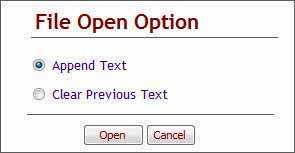
Conversion Process to convert your document into unicode simply open your document into Source Text by pressing “OPEN RTF/TXT FILE” button or you can directly paste your text in Source Text Area. You can also append many files.
converter

After that just press “START CONVERSION” button or press Ctrl + Shift + C an “Select Conversion Type” option dialog appears choose your desired conversion optiosn and press “Convert”.

Language : Select Marathi if your source text is in Marathi Language so that you can get accurate conversion for example in Marathi English fulstop used as purnviram not danda and some characters will not be converted if you choose Hindi for Marathi Language. So, it is recommended to select correct Language. For other Devnagri Script select Hindi.

Source Font : Select the source font of your source text, If your text is in Shusha or Shivaji, you can select either Shusha or Shivaji.

Select Conversion Option : Parivartak supports Four types of conversion:
1. Remington to Unicode e.g. Kruti to Mangal or Walkman-Chanakya to Mangal
2.
Semi-Phoenetic to Unicode e.g. Shivaji to Mangal or Shusha to Mangal
3. Remington to Semi-Phoenetic e.g. Kruti to Shusha or Kruti to Shivaji
4. Semi-Phoenetic to Remington e.g. Shusha to Kruti or Shivaji to Kruti
So, select your correct conversion type before conversion.

converter
You can hide ‘Select Conversion Type’ dialog box if you want to use current selected conversion settings for further process. You can show “Select Conversion Type” dialog box by clicking on Tools Menu then "Show Select Conversion Type" or click Options button from toolbar to on it.. Remember an important point if your source document is a text file do not enable “Leave English” because source text area will not recognize the format or font. It means for conversion it is compulsory your source text appears in correct font otherwise conversion treat it as english text and skip conversion. In this case, unchecked the "Leave English" and start conversion, you will get the conversion correctly.
Conversion
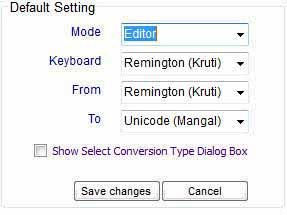
You can change Defailt Settings of Parivartak By Clicking on Options Button. If you want to set Editor or Converter as a Default Screen, just click on Options Button and change the setting and Press Save Button.

option


about parivartak

Promo


Parivartak v3.5
(HINDI UNICODE CONVERTER & EDITOR. It can easily convert Kruti Dev/Shusha font to Unicode Mangal Font...)
+
Mangal To Kruti v1.5
(Mangal to Kruti v1.5 is all new UNICODE CONVERTER FOR HINDI, MARATHI, NEPALI and Other DEVNAGRI SCRIPTS...)

at

US $ 65.00 Only
(save US $ 10)


Screenshots Single/Multiple Users License

Parivartak
Click on image to enlarge
Select User License Cost/User (USD) Total
(USD)
Single User $ 34.95 $ 34.95
3 Users $ 31.95 $ 95.85
5 Users $ 29.95 $ 149.75
9 Users $ 27.95 $ 251.55
11 Users $ 25.95 $ 285.45
Click on PayPal button to proceed
Bookmark and Share
 
 
offer
 
offer
 

New Parivartak 3.5 reduced our office workload to almost nil. This is greatest unicode tool we have seen till now. So fast I just cant believe it.
~ Dilip Mishra

I bought Email Extractor 3.0 and it worked perfectly for me. This is the best and most affordable software on the Net.
~ Andrew Jones

Your software has increased my Excel capability tremendously and it is so cheap that I cannot believe it.
~ Susan

I was stuck with so many Emails on my Outlook and wanted to get all the Email addresses but was not finding the way out, Fortunately I found your unique software which could let extracts emails from my Outlook.
~ Dan Phillips

We wanted to clean many Excel files but it was time consuming and frustrating finally we got your software and it does the same in minutes. Thanks for your help.
~ Michael

 
a Email Extractors
a Phone Number Extractors
a Whois Extractors
a Number Generator
a Word Count Softwares
a Excel Addins
a MS Office Tools
a Unicode Converter
a PDF File Convertors
a Data Recovery Tools
a Batch Files Printing Tool
a Word Find and Replace
a Bulk SMS Sender
a PDF Merger and Splitter
a   Services
a Customized Softwares
a Software Localization
a Multilingual Websites
a   Translation Ad
a   Awards
a
a
  a


We also do Customized Software Development and White Label Products.
    © All rights reserved by TechnoCom                                                                      | Contact : technocom@gmail.com
 
By Category
Email Extractors
Phone Number Extractors
Whois Extractor
Number Generators
Wourd Count Softwares
Excel Addins
MS Word Tools
Unicode Converters
PDF File Converters
Batch Files Printing Tools
Bulk SMS SenderNew
 Products
 Web Email Extractor Pro
 Websites Email Extractor
 Email Extractor Outlook
 Extractor Outlook Express
 Email Extractor Outlook 'N' Express
 Excel to PDF Converter
 Email Extractor Files
 Outlook Message Extractor
 All in One PDF Writer
 PDF to Image Converter
 Word to Image Converter
 Image to PDF Converter
 Phone Numbers Web Extractor
 Files Phone Number Extractor
 PDF to Text Converter
 Whois Extractor
 Pen Drive Files Recovery
 Batch Printing
 Number Generator
 Word to PDF Converter
 PPT to PDF Converter
 Text to PDF Converter
 Word Count 'N' Invoice
 Word FontReplacer
 Word Highlighter
 Batch Word Find & Replace
 Advance Word Find & Replace
 Line Count 'N' Invoice
 Office WordCount Standard
 Office Count 'N' Invoice
 Excel Word Count
 Excel Data Cleaner
 Excel Extra Space Remover
 Excel Duplicate Manager
 Excel Text Merger
 Excel Change Case
 Excel Number Date Format
 ExcelatorCTR
 ParivartakNew
 Mangal to KrutiNew
 PDF Merger and Splitter
 Word Count MiniNew

 Services
 Customized Softwares
 Software Localization
 Multilingual Websites
 Special Offers
 Discounts & Promos

 Quick Links
  Home
  Products
  Support
  Order
  Download
  Contact Us
 importantlinks

 Privacy Policy
 Privacy Policy

 
Home Products Download Products Products Order Support Contact Us